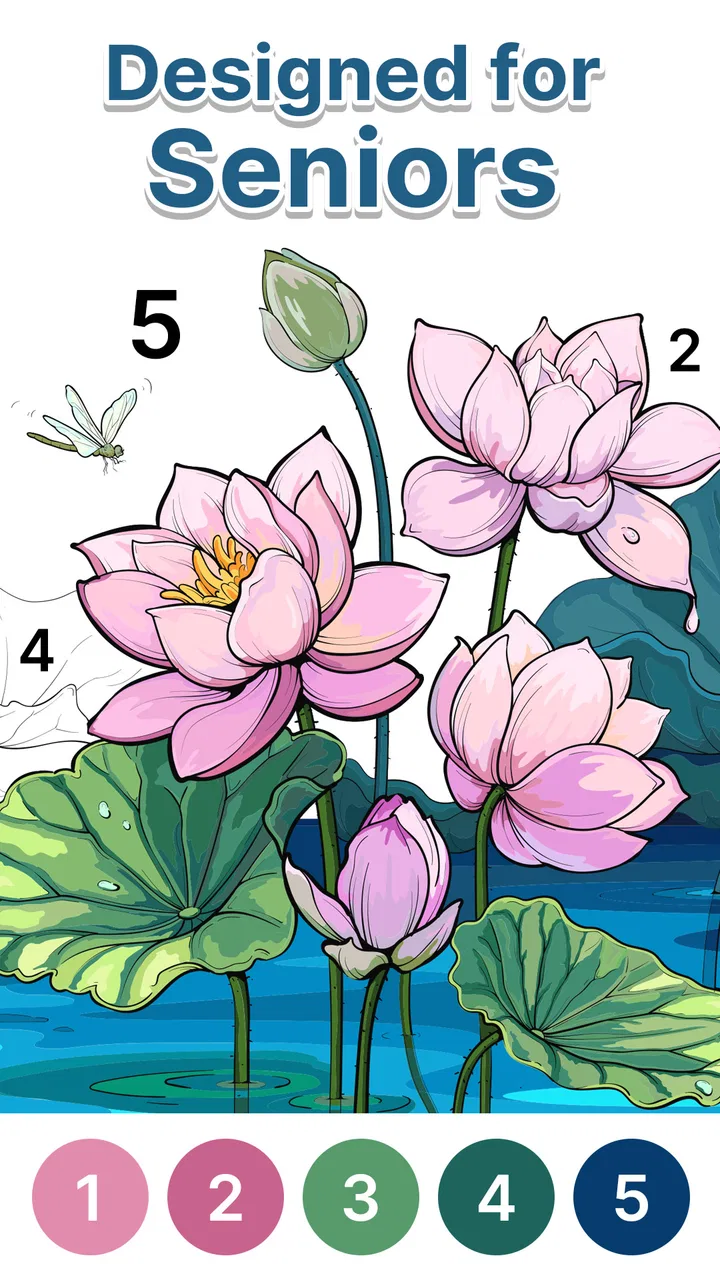
Anima Color - Paint by Number
- 4.6
- Rating
- 1.00M
- Installs
- Free
- Price

 Analysis by App-foxy
I found Anima Color - Paint by Number to be a calm, straightforward board game built around coloring numbered areas rather than competing against another player. Its appeal is easy to understand: choose an illustration, match colors to numbers, and gradually turn a mostly plain image into something complete. I spent time looking at it less as a quick distraction and more as a tool for quiet concentration, especially for people who enjoy repetitive tasks with a visible result.
The game is made by Candy Mobile and is free to use. It is listed for Everyone, runs on Android 6.0 or later, and its current version is 1.9.6. The app has reached over 1 million installs, with an average rating of 4.6 from roughly 13,000 ratings. Those figures suggest that the basic coloring-by-number idea is connecting with a large audience, but they do not tell the whole story. What matters in daily use is whether the interface remains comfortable when your eyes, hands, attention, or surroundings are not ideal.
A calm coloring board that is easy to understand
I focus here on what makes this coloring board approachable: its clear link between numbered spaces and the colors that complete them. That structure can make starting feel less intimidating than a blank page, while still asking for steady attention. The next section looks at how I’d use that simple loop comfortably, including a small choice that can make a first session easier.
You May Also Like

 Blood Strike: 2.5 Anniversary
Blood Strike’s Loadouts Turn Every Drop Into a Tactical Gamble
A close look at Blood Strike’s custom loadouts: how fast access to signature weapons reshapes its battle royale rhythm, rewards preparation, and narrows the gap between fights.

 Pandora - Music & Podcasts
Pandora’s Music Is Easy to Start, but Harder to Recover
Pandora’s strength is its low-effort path from a seed to a station. Its weak spot is how much confidence it asks you to place in connection, setup, and quiet recovery.

 8 Ball Pool
 Is Built on Rivalries, Rematches, and Routine
A close look at the rivalries, rematches, shared routines, and unanswered safety questions that turn a quick pool match into a persistent mobile community.

 Samsung Music
’s Quiet Strength Is Playing What You Already Own
Its reach comes less from spectacle than from dependable access to a personal library. That simplicity is both the app’s strongest retention engine and its ceiling.

 AccuWeather: Weather Radar
AccuWeather Review: A Quick, Clear Forecast for Everyday Decisions
For everyday plans, the best forecast is the one you can understand quickly. AccuWeather makes rain timing, radar, and local conditions easy to act on, with a few trade-offs.

 Hill Climb Racing
Why Hill Climb Racing Still Turns Crashes Into One More Run
A tiny car, a bumpy hill and one more upgrade: Hill Climb Racing keeps resurfacing because its simple chaos makes every near-miss feel personal.
More From Our News Desk



Readability and navigation without a steep learning curve
The strongest part of the experience is the simple relationship between the picture and the color task. You are not learning a complicated ruleset, managing a collection of characters, or trying to understand a strategic board. The main job is to identify the numbered area and apply the matching color. That makes the game approachable for older users, people who rarely play mobile games, and anyone who wants an activity that explains itself through interaction.
I also like that the central activity has a natural rhythm. You can work on a large section, pause, and return without needing to remember a complicated plan. This is useful when concentration comes and goes. A user can approach it as a short break or stay with one illustration longer, depending on energy and patience. The game does not demand the kind of constant attention that a timed puzzle or competitive board game usually requires.
For someone who has difficulty processing busy menus, this kind of focused format is a benefit. The image stays at the center of the experience, and the number-color relationship gives each action a clear purpose. It is much less intimidating than a board game with several panels, scores, turns, and changing objectives. In that sense, the design supports cognitive simplicity even without making broad accessibility promises.
There is an important difference between simple rules and effortless reading, though. Numbered coloring still asks you to distinguish small areas and recognize the correct number. As an illustration becomes more detailed, the task can become visually demanding. I would not assume that every picture will be equally comfortable for someone with reduced vision. The experience is clearest when the phone or tablet is held at a practical distance and the screen is large enough for the artwork.
My first useful tip is to begin with the least visually dense image available rather than choosing the most attractive picture immediately. A simpler design lets you judge whether the numbers and spaces are comfortable for you. If the smallest sections already feel tiring, a larger screen may help more than simply increasing the time spent playing.
How the coloring task feels for different hands and eyes
The game’s interaction is based on tapping areas, so it does not require fast swipes, complex gestures, or precise timing in the way many action games do. That makes it a reasonable option for players who prefer slower, deliberate input. It can also suit someone using one hand during a quiet moment, although the comfort of that setup depends on the size of the device and the detail of the selected drawing.
At the same time, tapping small numbered sections is not automatically easy for every player. People with tremors, limited finger control, joint pain, or fatigue may find detailed pictures frustrating. A missed tap can interrupt the relaxing flow, particularly when the remaining areas are tiny and close together. I would treat this as a trade-off: the game avoids rapid reactions, but it still relies on controlled touch.
That distinction matters for older users. The broad concept is senior-friendly because it is quiet, familiar, and not competitive, but the physical comfort will vary from person to person. A tablet can provide more room for the artwork than a small phone, while a stylus may feel more controlled for some users. Those are practical choices rather than special functions of the game, but they can change the experience considerably.
Color perception is another consideration. The activity depends on matching a displayed color to the correct numbered area, so a player with color-vision differences may need to rely more heavily on the numbers than on color alone. That can work when the number remains easy to identify, but it may be less comfortable in crowded sections. I would test a few illustrations before deciding whether the game is suitable for regular use.
For sensory-sensitive players, the quiet, noncompetitive nature is one of its better qualities. Coloring usually creates less pressure than countdown-based play, and the gradual completion of an image can feel predictable. Still, the visual detail may become tiring during a long session. I recommend using it in short intervals, lowering screen brightness to a comfortable level, and stopping when the task starts to feel like work rather than relaxation.
Where it fits into an ordinary day
I can picture using this game after dinner, during a waiting period, or before bed when I want something more purposeful than scrolling through social feeds. A realistic scenario would be an older family member sitting with a tablet in the afternoon, choosing a picture, coloring for ten minutes, and putting the device down without having to compete, remember a storyline, or respond to other people. That low-pressure routine is where the game makes the most sense to me.
It can also work as a shared activity, even though the coloring itself is individual. A relative could help select an image or identify a difficult number, then leave the player to complete the easier sections independently. This creates a gentle way to spend time together without turning the session into a lesson. However, I would avoid presenting it as a substitute for social contact. It is an individual game first, and its calming quality comes partly from not requiring conversation or coordination.
Situational access is also affected by the device. On a phone, the game is convenient and portable, but small details may be harder to inspect. On a tablet, the larger canvas should be more comfortable for many users, especially when the illustration contains numerous small spaces. If you are playing in bright sunlight, reflections can make numbers and colors harder to distinguish. In a dim room, glare is less of a problem, but eye strain can become more noticeable.
Because the game is free, it is easy to try without making a financial commitment. That is useful for families who want to see whether a parent or grandparent actually enjoys the activity before investing in anything else. The Everyone age classification also makes it broadly suitable for households, although suitability still depends on the individual player’s vision, dexterity, and tolerance for repetitive work.
One practical workflow I found sensible is to treat the game as a planned pause rather than an endless activity. Choose one image, play until your attention drops, and stop before frustration appears. This approach preserves the relaxing side of the experience. It also helps users who may otherwise continue searching for the “perfect” picture instead of enjoying the coloring itself.
How it compares with familiar alternatives
Compared with traditional coloring books, Anima Color removes the need for pencils, sharpeners, erasers, and a clear table. It also gives the player a defined color target, which can be reassuring for anyone who does not enjoy making artistic decisions. The digital format is more portable and less messy. On the other hand, a paper book offers a larger physical surface, natural hand movement, and no screen glare, so it may be a better choice for someone who finds phone interaction tiring.
Compared with free-form digital painting apps, this game is much less demanding creatively. You are not choosing every shade or building an image from a blank canvas. That limitation is also its advantage: the numbered structure reduces decision fatigue and makes progress obvious. If you want artistic freedom, layering, or detailed brush control, a painting app will be more satisfying. If you want a guided activity that tells you what to do next, this game is the better fit.
Compared with competitive board games, it has almost no social pressure. There is no opponent to beat in the activity described by its core concept, and the pleasure comes from completion rather than winning. That makes it more suitable for winding down than for a group game night. Someone looking for strategy, bluffing, negotiation, or replayable competition should choose a conventional digital board game instead.
It also differs from puzzle games that reward speed or problem-solving. Number matching involves attention, but it does not offer the same mental challenge as planning several moves ahead. I would recommend it to someone who wants a repetitive focus exercise, not to a player seeking deep strategy. The distinction is important because the attractive board-game label may create expectations that this is a competitive or tactical experience.
Remaining barriers and small sources of friction
The biggest limitation is the dependence on visual detail. A picture can look appealing in a preview yet become tiring once you begin searching for small numbered spaces. This is especially relevant for users with limited vision, difficulty distinguishing similar colors, or reduced patience for precise tapping. The game’s calm concept does not remove those demands; it simply makes them slower and less pressured than in many other games.
Another limitation is repetition. The same basic action—find a number and fill its matching area—can be soothing for one person and monotonous for another. I would skip this game if you need constant novelty, narrative progression, or a strong sense of challenge. It is not trying to be a full strategy experience, and its value decreases quickly if you do not enjoy repetitive completion.
There is also a difference between being free and being frictionless. A free download is convenient, but the overall comfort of using it still depends on the phone, the screen size, the player’s eyesight, and the environment. Someone in a noisy waiting room may find the simple task helpful, while someone trying to use a small phone outdoors may find the same task awkward. The context changes the result more than the basic rules do.
Before recommending it to an older relative, I would do a short trial rather than assuming the “for seniors” positioning will suit everyone. Watch whether the person can identify the numbers without leaning too close, whether tapping feels comfortable, and whether the activity creates calm or irritation. If the controls seem difficult, paper coloring with larger printed sections may be kinder. If the person wants more independence but struggles with a phone, a tablet could be the more important improvement.
The developer, Candy Mobile, has kept the concept easy to approach, and the current release is version 1.9.6. I would still keep expectations realistic: a version number does not change the fundamental nature of the game. It remains a focused coloring activity, not a complete accessibility tool or a replacement for every kind of board game. Its success depends on whether the player enjoys matching, tapping, and gradual visual completion.
Who should try it, and who should choose something else
I think it is a good match for someone who wants a quiet digital pastime, likes coloring but does not want to make every artistic decision, and prefers progress without pressure. It is particularly appealing for older players who enjoy familiar, orderly activities and for relatives looking for a simple game to introduce on a phone or tablet. The broad age classification and free price make experimentation easy.
I would be more cautious for anyone with significant difficulty reading small numbers, distinguishing colors, or tapping accurately. The game may still be worth testing on a larger device, but I would not promise a comfortable experience. People who dislike repetitive tasks, want multiplayer interaction, or expect complex board-game strategy should also look elsewhere. A paper coloring book, a free-form art app, or a traditional competitive board game may serve those needs better.
My overall view is positive but specific: this is best understood as a guided digital coloring routine, not as a demanding board game. Its clearest strength is the way it turns a potentially intimidating creative activity into a sequence of manageable choices. Its clearest weakness is that the same numbered detail that gives the game structure can create a barrier for tired eyes or unsteady hands.
For me, the inclusive value comes from its low-pressure pace and understandable goal, not from assuming that one interface works for everybody. Use a larger screen when possible, start with simpler artwork, take breaks, and judge comfort by the player rather than by the label. If those conditions work, Anima Color - Paint by Number can be a pleasant way to settle the mind for a few minutes. If they do not, a physical coloring book with larger shapes may be the more genuinely relaxing option.
FAQs for Anima Color - Paint by Number
01What is Anima Color - Paint by Number and how does it work?
Anima Color - Paint by Number is an engaging and relaxing app that allows users to create beautiful artwork by following a number-based coloring system. Each image is divided into sections marked with numbers, which correspond to specific colors. Users simply select the correct color and tap on the corresponding section to fill it in, gradually transforming the image into a vibrant masterpiece.
02Is Anima Color - Paint by Number free to use, or does it have in-app purchases?
Anima Color - Paint by Number is free to download and offers a range of free images to color. However, the app includes in-app purchases for additional features, such as premium images, ad-free experience, and exclusive coloring tools. These purchases enhance the user experience but are optional, allowing for enjoyment without spending money.
03What are the main features of Anima Color - Paint by Number?
The app features a vast library of images across various categories, a user-friendly interface, daily updates with new images, and relaxing music to enhance the coloring experience. It also offers a ‘hint’ feature to assist when users are stuck. The app's intuitive design makes it suitable for users of all ages and skill levels.
04Can I use Anima Color - Paint by Number offline?
Anima Color - Paint by Number generally requires an internet connection to download new images and updates. However, once an image is downloaded, users can color offline without any connectivity issues. This makes it a great option for users who want to enjoy the app during travel or in areas with limited internet access.
05Is Anima Color - Paint by Number suitable for children?
Yes, Anima Color - Paint by Number is suitable for children. It offers an easy-to-use interface and a wide range of images appropriate for different age groups. The app can help improve concentration and develop fine motor skills in younger users while providing a creative and relaxing activity that the whole family can enjoy.
Pros
- Wide variety of intricate designs.
- User-friendly and intuitive interface.
- Relaxing music enhances experience.
- Regular updates with new artwork.
- Offline mode available for convenience.
Cons
- Ads can be frequent and intrusive.
- Limited free content without purchase.
- Some images too complex for beginners.
- Occasional app crashes reported.
- Color palette can be repetitive.

Anima Color - Paint by Number
Gallery